Custom CRM
Every opportunity has a next step.
Sales tracking built around the way you sell: conversations, proposals, follow-ups and decisions in the same file.
Your software, with Kap, the AI from Propul AI, plugged in: the connector and the Kap Cloud setup are included. Discover Kap
01Sell
Know who to call back: a pipeline by stage and a work list sorted by due date.
02Track
Pick up the right file: contact details, notes, calls and the next action in one place.
03Deliver
Go from signed to delivered: projects in stages, with their tasks, owners and blockers.
One toolFrom sales to delivery
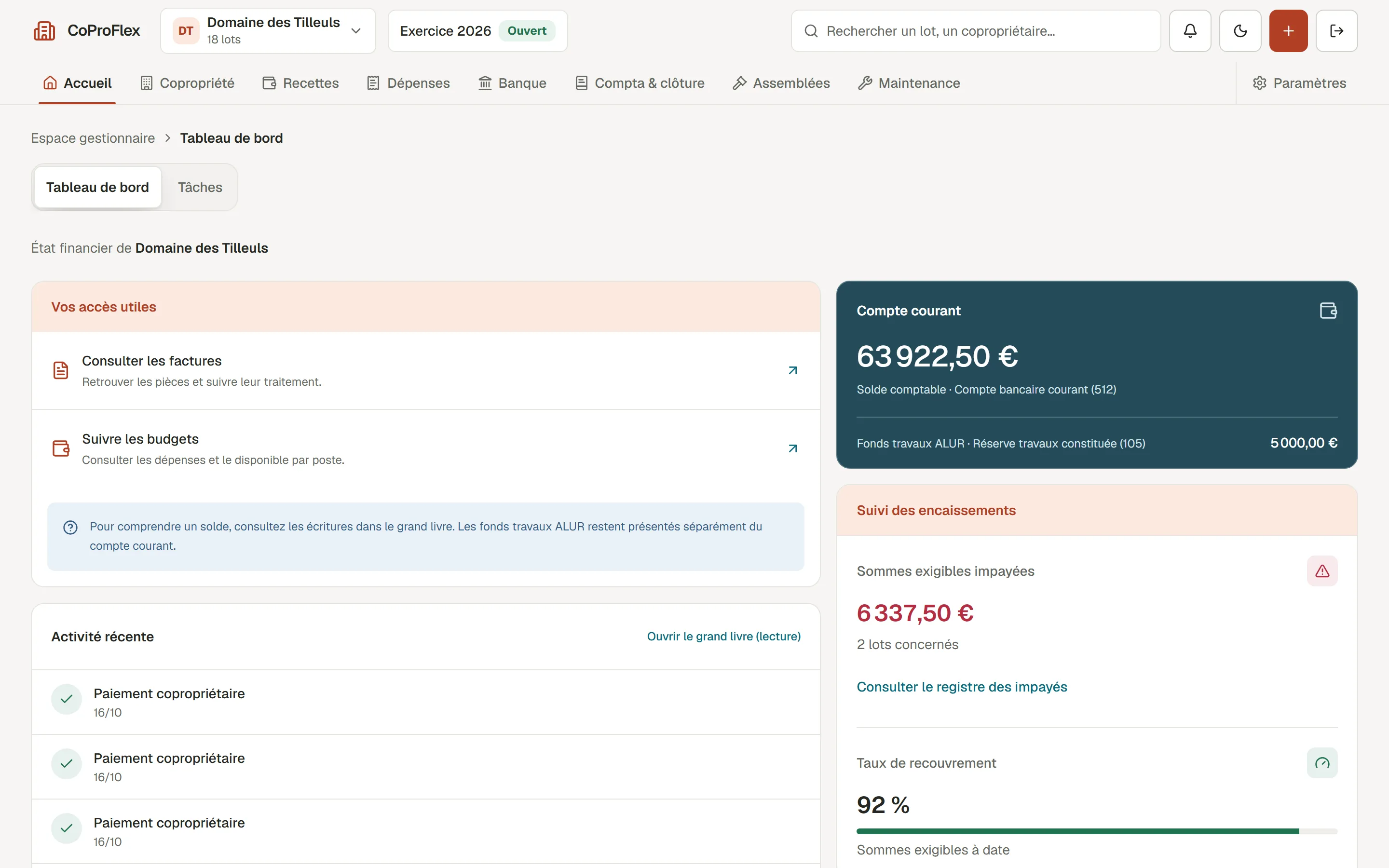
Demo based on the CRM we built for Propulseo. Fictional data.
In short
A custom CRM is a sales tracking tool built around your sales cycle: conversations, proposals, follow-ups and decisions stay in the same file. It makes sense when this tracking has to fit with your quotes, your jobs or your invoicing. At Propulseo, it is paid for when it’s built: our benchmark for a management tool is €6,000 to €60,000 excl. VAT, then running costs. Overview: custom software.
Built for Propulseo
Our team has its tool. Yours can have its own.
This is the CRM we built for Propulseo. Leads, conversations and proposals are linked to project tracking, so the team keeps the context at every step. For your team, we define the stages, data and connections that matter to your business.
Know who to call back.
A pipeline by stage and a work list sorted by due date.
Pick up the right file.
Contact details, notes, calls and the next action in one place. Every follow-up keeps its context.
Go from signed to delivered.
Projects structured in stages, with their tasks, owners and blockers.
Choosing
Which CRM should a small business choose?
The one your team will actually fill in. Start from your real sales cycle: where requests come from, which steps, who follows up. An off-the-shelf tool works if that cycle is standard. Three questions to decide:
- Does your sales cycle fit the steps offered by an off-the-shelf tool, exceptions included?
- Does sales need to connect to production, jobs or invoicing?
- How many users in three years, and what will the licence cost then?
Comparing
Custom CRM or HubSpot: which to choose?
A tool like HubSpot offers many ready-made features, and its cost rises with users and modules. A custom CRM contains only what you need and connects to your other tools. Test both on your real cases before deciding, and compare them over three years, with the expected number of users.
The quote sets out the scope, the assumptions (data to migrate, software to connect, roles) and what you receive. To compare proposals: business software quote and prices and quotes.
The scope
What we build together.
The scope, content and connections you choose determine the price. We define them before pricing.
Your sales cycle
We capture the stages and rules that matter to your team.
You leave withA pipeline with its statuses and responsibilities.
The file’s memory
Conversations and proposals stay linked to the right opportunity.
You leave withA sales record and its history.
Next actions
Tasks and reminders mean you don’t rely on anyone’s memory.
You leave withA tracking view and configured reminders.
A well-scoped investment
Before you say yes, everything should be clear.
A quote should help you decide. It shows what will be built, what is still to be defined and what you will receive.
-
01The scope
We price a specific way of working, with its limits.
The scope, content and connections you choose determine the price. We define them before pricing.
You leave withA decision document: your project’s scope.
-
02Assumptions
The right questions prevent surprises.
Existing data, software to connect, roles and responsibilities: which files to migrate, which connections, who validates the rules.
NoteThese assumptions are discussed before building starts.
-
03Handover
What you receive at delivery.
The code, access and documentation needed to run your tool. Kap is plugged in: we build the connector and set up Kap Cloud.
NoteHandover terms are clarified from the start.
Related work
Projects you can open.
Frequently asked questions
Your questions, before we start.
Something specific? Write to us
Which CRM should a small business choose?
The one your team will actually fill in. Start from your real sales cycle: where leads come from, what the stages are, who follows up. An off-the-shelf tool works if that cycle is standard. A custom CRM makes sense when sales tracking has to tie in with your quotes, your jobs or your invoicing.
How much does a CRM cost?
An off-the-shelf CRM is paid per user per month, with tiers based on features. A custom CRM is paid for when it’s built: our benchmark for a management tool is €6,000 to €60,000 excl. VAT, then running costs. Compare the two over three years, with the expected number of users.
What is a custom CRM?
A sales tracking tool built for your team: your sales steps, your rules, your follow-ups. It keeps contacts, conversations, quotes and next actions in one place.
Can you build your own CRM?
Yes. A shared spreadsheet or a no-code tool is enough to start. As soon as several people work in it, you need access rights, a history and automatic follow-ups.
What are the three types of CRM?
Operational CRM tracks contacts, sales and service. Analytical CRM makes use of the data. Collaborative CRM shares information between teams. In a small business, one tool usually covers all three.
Can a custom CRM connect to our quotes and invoicing?
Yes, that is actually the main reason to have one built. The software to connect and the included connections are listed during scoping, before the build.
Going further
Going further
Your starting point
Let’s talk about what you want to move forward.
Your context, your constraints and a first priority. Together we will define the useful next steps.
- First conversation
- The conversation and the audit are free.
- Proposal
- Detailed, within 48 hours.
- Direct contact
- team@propulseo-site.com
+33 6 95 32 13 89