Custom management software
Your files move forward. So does your team.
Find clients, conversations, quotes and the calendar in one place. Everyone knows where each file stands and what comes next.
Your software, with Kap, the AI from Propul AI, plugged in: the connector and the Kap Cloud setup are included. Discover Kap
01Clients
One shared record, from contact details to the latest conversations.
02Quotes
Quotes linked to the client, with their versions and status.
03Calendar
Appointments, availability and tasks in one place.
Your dataOne shared source of truth
04Invoicing
Invoices and due dates linked to each file.
05Documents
The documents you need, reachable from the right file.
06Follow-ups
Follow-ups to do, assigned to the right person.
Demo: an example of a first scope. Yours is defined together.
In short
Custom management software brings a small business’s clients, conversations, quotes and calendar together in one place, built around its rules. Our benchmark is €6,000 to €60,000 excl. VAT, for an indicative timeline of 11 to 25 weeks. Kap, the AI assistant from Propul AI, is plugged in and set up in Kap Cloud; its subscription is separate. Overview: custom software.
The starting point
What slows down your day.
These situations are the starting point for scoping. We check which ones apply to you and what your tools already cover.
Several files, several versions of the truth.
Finding the latest version means comparing files.
Rules that are hard to pass on.
Exceptions and habits are not yet shared with the team.
Corrections between quote and invoice.
You have to go back, fix and explain.
The monthly review means re-entering data.
You rebuild the information instead of reading it.
The spreadsheet
When is a spreadsheet no longer enough?
When several people enter data in the same file, when a mistake has already cost a client or an invoice, or when you spend more time maintaining the file than using it. As long as one person uses it for analysis, the spreadsheet remains a good tool. The limits to watch for:
- A spreadsheet doesn’t know who changed what.
- It doesn’t manage access rights.
- It gets duplicated into several versions.
- It doesn’t warn anyone when a step is late.
Choosing
What is the best management software for a small business?
The one that follows your work without forcing you to change it. The method has three steps:
- List three common situations and two exceptions.
- Run them through each tool you are considering, including a custom proposal.
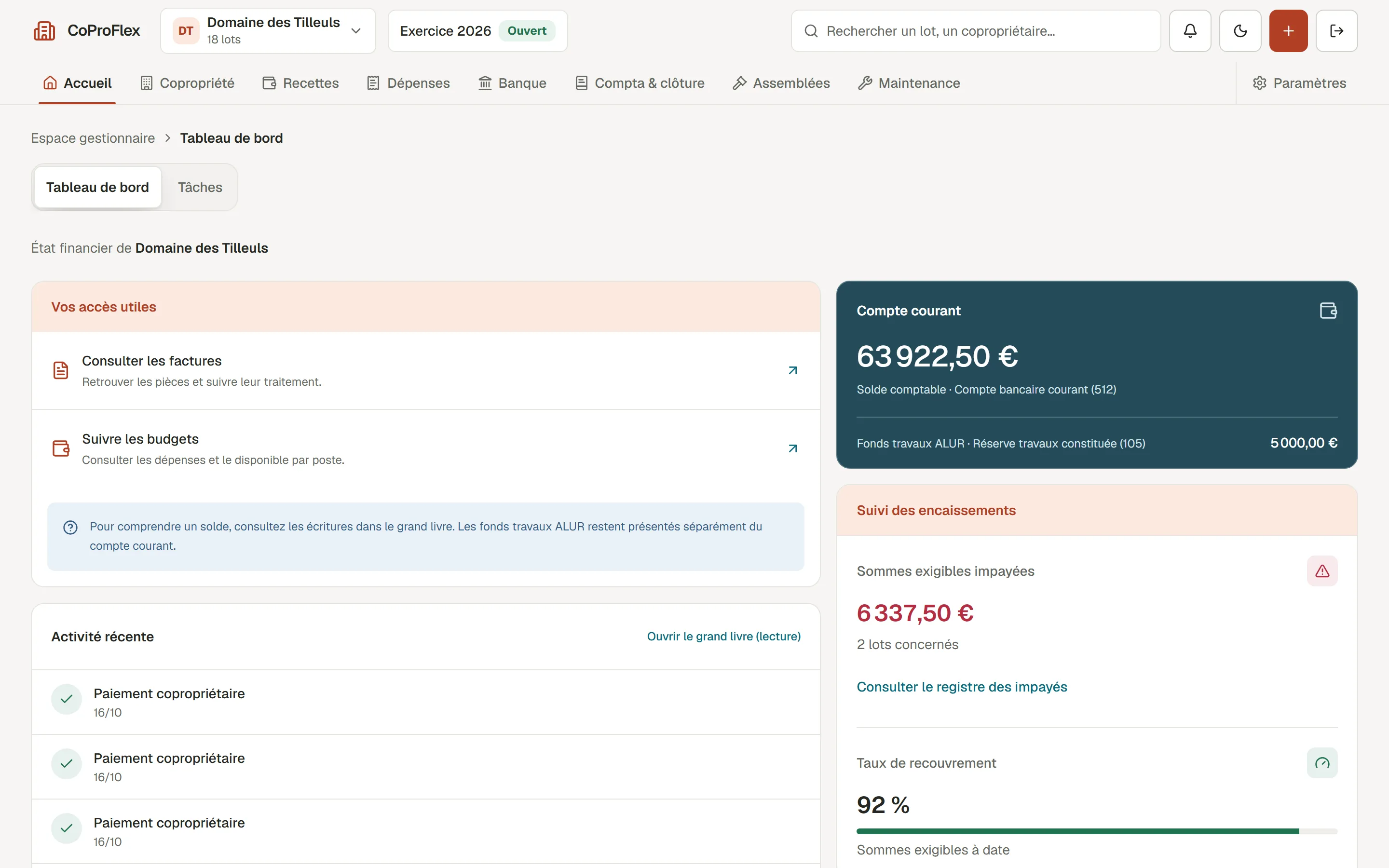
- Compare the cost over several years: licences, configuration, onboarding, connections and exit terms. To compare two proposals: business software quote. An example built on a verifiable scope: the CoProFlex case study.
A well-scoped investment
Before you say yes, everything should be clear.
A quote should help you decide. It shows what will be built, what is still to be defined and what you will receive.
What your first version must achieve
- The operations covered
- The processes selected, their special cases and the people involved.
- The modules to deliver
- The user journeys, data and business rules that make this scope usable.
- The acceptance criteria
- Real work cases to try the tool and decide on going live.
We price a specific way of working, with its limits.
The right questions prevent surprises
- Existing data
- Which files to migrate, in what state, with what consistency checks?
- Software to connect
- Which connections are available, needed and included in the first scope?
- Roles and responsibilities
- Who uses the tool, who validates the rules and which access rights need to be separated?
These assumptions are discussed before building starts.
A tool you can keep alive
- How it works
- The modules in the agreed scope, the business rules and the migrated data.
- Control
- The code, access and documentation needed to run your tool.
- Onboarding
- Support for your team, defined during scoping.
Handover terms are clarified from the start.
From scoping to onboarding
You know where you are going. At every step.
An indicative timeline of 11 to 25 weeks depending on scope.
-
01Mapping
2 to 3 weeks
First, look at how you work.
We observe real operations, the exceptions and the people who know the rules. The spreadsheet is only a starting point.
You leave withA map of your processes and pain points.
-
02Scoping
1 to 2 weeks
Decide what goes into the first version.
Data, roles, user journeys and integrations are spelled out. You know the scope, the assumptions and the budget before building starts.
You leave withA written scope and budget.
-
03Building
6 to 16 weeks
Try the tool as it is being built.
Modules arrive step by step. Your feedback validates the business rules and adjusts the user journeys before we move on.
You leave withModules tested on your real work cases.
-
04Switchover
2 to 4 weeks
Move forward, with your team.
Data is migrated and checked. A period of running both systems side by side and the documentation support the change. Kap is plugged into your software: we build the connector and set up Kap Cloud. What a private AI in a small business brings is explained by Propul AI.
You leave withAccess, data, Kap plugged in, and a tool you can use every day.
Frequently asked questions
Your questions, before we start.
Something specific? Write to us
How much does custom management software cost?
Our benchmark for a management tool is €6,000 to €60,000 excl. VAT. Connections to other software, complex data migration or a wider scope can push it higher. Running costs and later changes are priced separately. This benchmark is not an automatic quote.
How long does it take to build management software?
Our indicative timeline runs from 11 to 25 weeks depending on scope: 2 to 3 weeks of mapping, 1 to 2 of scoping, 6 to 16 of building and 2 to 4 of switchover. A first version should let you run one process from end to end, even if it covers only a few topics.
Custom software or an off-the-shelf package: which should you choose?
First try an off-the-shelf tool on your real cases, exceptions included. If it covers them, it will cost less to get started. Custom software makes sense when the way you work is what sets you apart, or when you pay for licenses with features you never use. There is a middle path: keep what works and build the missing link.
Do we have to replace everything at once?
No. The first scope targets a coherent set of needs. Your other tools can keep running during the transition.
What if the way we work changes?
The data model and rules are explicit so the tool can evolve. Scope changes are discussed and priced before any work is done.
How do we get the team to adopt the new tool?
Users take part in scoping and testing. The switchover includes support, access and documentation.
What is business software?
A tool built around the work of a profession or a company: its files, its steps, its rules. It brings together what was scattered across spreadsheets, email and separate software.
Can an Excel file be turned into management software?
Yes. Columns become fields, tabs become screens, formulas become rules. Most of the work is cleaning the data and deciding who approves what.
Is Kap included in the software?
Connecting Kap and setting it up in Kap Cloud are included. The Kap subscription is still paid, at propul-ai.com pricing.
What do you hand over at the end of the project?
The agreed modules, the code, the access, the documentation and the team onboarding. The handover terms are made clear from the start.
Can we keep our current software?
Yes, when it meets your needs and allows the necessary connections. We first check what can be kept and connected.
Going further
Going further
What comes next starts with a conversation
Let’s start from your real working day.
Show us a file, a quote or a process that takes too long. Together we will define the first useful scope.
- First conversation
- The conversation and the audit are free.
- Proposal
- Detailed, within 48 hours.
- Direct contact
- team@propulseo-site.com
+33 6 95 32 13 89